
Chapter 10 · 10.1
What is Talk and who has it?
Available in packages with Office. Talk is included in your WebOké Nextcloud as soon as your package has at least one Office Suite licence. Then everyone in your package can use Talk, even users without their own licence. If you don't have Office, you won't see Talk in the menu. See Which apps are included in my package?.
Talk is the chat and calling app in your WebOké Nextcloud. You send messages to colleagues, family members or other members of your association, make calls with or without video, share your screen and invite guests via a link. Everything runs through your own Nextcloud on our servers in the EU, so not through Microsoft Teams, Zoom or WhatsApp.
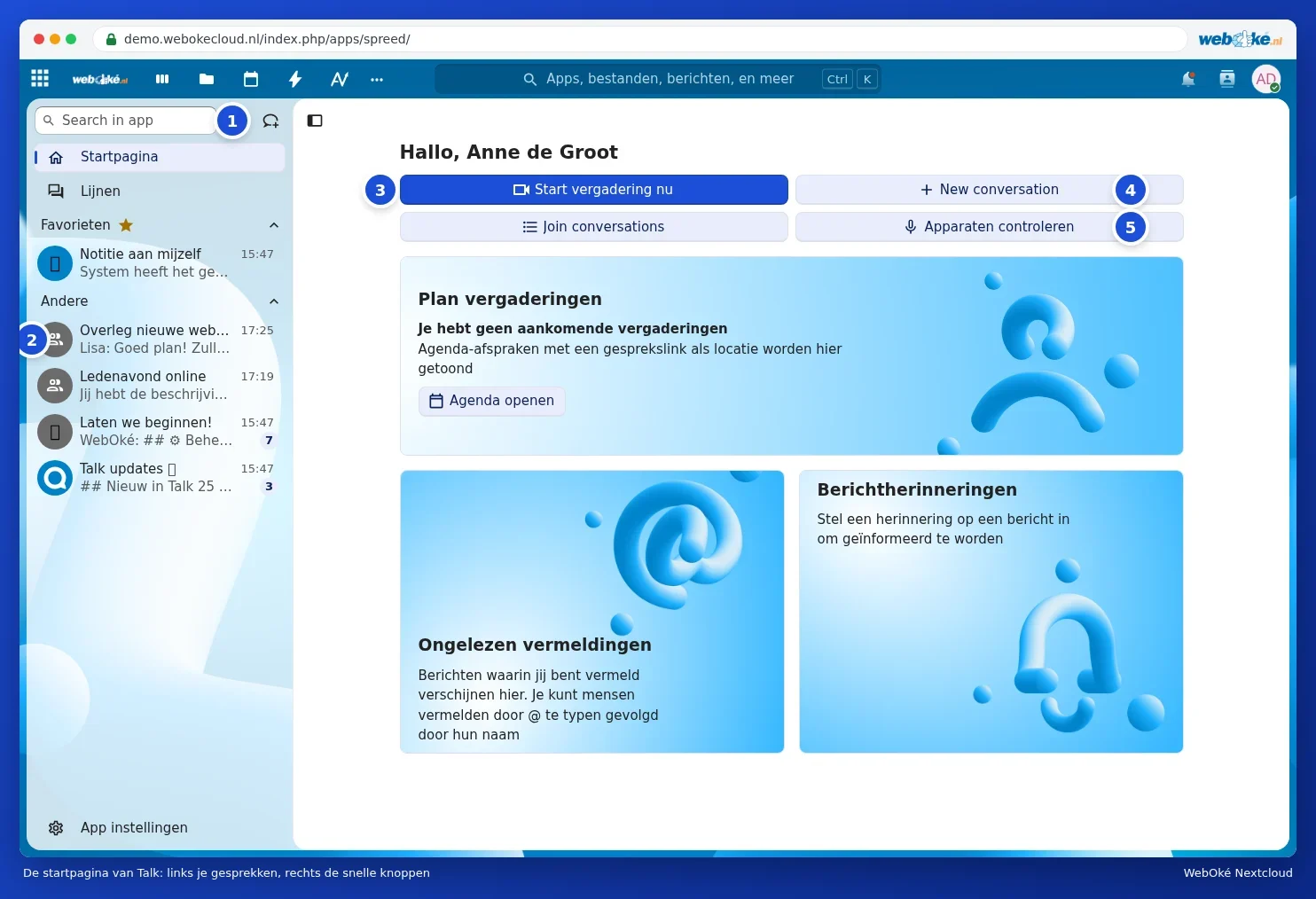
Opening Talk
Click the Talk icon at the top (a speech bubble with a magnifying glass), or choose Talk from the three dots in the app menu. You'll land on the Talk Home page.
- Use the Search in app search field (1) to find a conversation or a person. Next to it is the button for creating a new conversation.
- Your conversations are listed on the left (2), with the newest at the top. A number next to a conversation shows the number of unread messages. Conversations you mark as a favourite appear at the top under Favourites.
- Start meeting now (3) immediately creates a meeting with a link you can forward.
- New conversation (4) creates a new conversation. Join conversations shows open conversations you can join yourself.
- Check devices (5) tests your camera, microphone and speaker before you call.
Tip: a few buttons on the Home page are still in English (New conversation, Join conversations). That's because they come from Nextcloud itself; once the translation is ready, they'll appear in your language automatically.
What can you do with Talk?
| What | How | Read more |
|---|---|---|
| Chat with one person or a group | Create a conversation and send messages, including emoji, reactions and voice messages | Starting a conversation: one-to-one, group or team |
| Make calls and hold video conferences | Click Start call in a conversation | Video calling and meetings: camera, microphone, background and raising your hand |
| Show your screen | Share your screen during a call | Sharing your screen |
| Let people without an account join | Share a guest link | Inviting guests via a link (without an account) |
| Share files and view them together | Using the plus sign next to the message field | Sharing files and viewing them together in a conversation |
| Talk on your phone | The Nextcloud Talk app | Talk on your phone and notifications |
Who can I reach?
- Everyone in your own Nextcloud. You can add all users in your package to a conversation, including groups and teams.
- People without an account can join as a guest via a link. All they need is a browser. See Inviting guests via a link (without an account).
- Users of a different Nextcloud (for example, with another provider) can't be added directly. Send them a guest link instead.
Please note: you can't record conversations in your WebOké Nextcloud. Calling an ordinary phone number isn't possible either. If you want to keep a record, take minutes in a shared document or in Creating notes and using them on your phone.
What happens if Office is removed from your package?
Then Talk disappears from the menu. Your conversations and messages are kept. If you switch Office back on later, they'll be there again. You manage Office licences in My WebOké, see Assigning and ordering extra Office licences.